
Dutch vocabulary, every day
Learn Dutch words that stay learned
PolyYapp is a free iPhone and iPad app for learning Dutch vocabulary. It brings every word back on a spaced-repetition schedule, drills it with 5 exercise types, and lets you add the words you meet in real life. There is no account to create, no ads, and you can learn from 7 languages.
iPhone · iPad · Apple silicon Mac

Inside the app
Features
What PolyYapp does
Five parts, each one a page of its own: how words are scheduled, how they are practised, how you add your own, the daily game, and the languages you learn from.
Spaced repetition
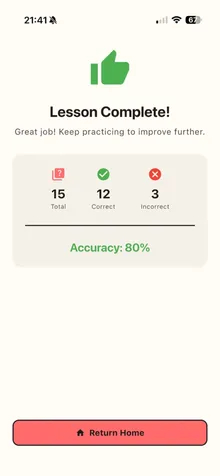
Every lesson is filled first with the Dutch words due for review, then topped up with new ones. Each word climbs its own review schedule.
Exercises
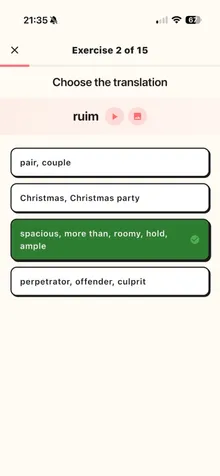
5 exercise types, from recognising a Dutch word to typing it from audio and filling it into a sentence. Harder ones unlock per word.
Your own words
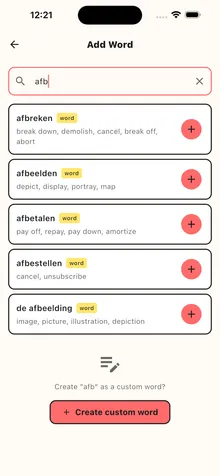
Search the Dutch dictionary, add the words you meet in real life, and they join the same review schedule as everything else.
Daily word game
Guess-a-Word: one hidden Dutch word a day, the same for everyone. Ask yes-or-no questions in Dutch and an AI game master answers.
Learn in your language
Study Dutch straight from English, Spanish, French, Polish, Russian, Turkish or Ukrainian: one setting changes the app and the meanings.
All features, in one table
What each part of the app does, what it needs, and what it does not do.
Topics
Why you are learning Dutch
Inburgering, a vocabulary to build, or Dutch in general: what helps, and how much of it a vocabulary app can honestly cover.
Inburgering
What the civic integration exam asks for, where Dutch vocabulary helps (Reading and Listening) and what a vocabulary app cannot do for you.
Dutch words
Which Dutch words to learn, how to remember de or het, and how to make new words stick, with a word list that grows as you meet words.
Learning Dutch
Choosing tools for learning Dutch as an adult: what a course gives you, what a vocabulary app gives you, and why most people need both.
Honest limits
What PolyYapp is not
PolyYapp is a vocabulary trainer, and it is better at that for not pretending to be more. Pair it with a course or a teacher for the rest.
- Not a full course: there is no lesson path, no levels and no placement test.
- No grammar lessons. Word cards show the article on nouns and forms such as plurals and past tenses where the word has them, not as drills.
- No speaking practice, pronunciation scoring or speech recognition.
- Not exam preparation. It helps with vocabulary for inburgering, not with KNM, Speaking or Writing.
- Not on Android, and not offline: it needs an internet connection.
Questions
Before you install
Is PolyYapp free?
Yes. PolyYapp is free to download and use, with no in-app purchases and no ads today. The only limits are anti-abuse caps: 10 new custom words a day, and 10 questions and 3 hints a day in the word game. The privacy policy reserves the right to add purchases later, so this page does not promise "free forever". The free Dutch apps roundup compares what each app's free version actually includes.
Do I need an account to use PolyYapp?
No. The first launch creates an anonymous ID on the server and shows one welcome screen, then a Start Lesson button. Sign in with Apple is optional; it links your progress to your Apple ID so it is not lost, and it is needed only to create new words that are not in the dictionary, for the Profile screen, and to delete your account in the app.
Does PolyYapp work offline?
No. PolyYapp needs an internet connection: lessons, words, audio and your progress all come from the server, and the app cannot start without a connection. That is also why your progress survives a reinstall, and moves to a new phone through an iCloud backup or Sign in with Apple.
Which devices does PolyYapp run on?
iPhone and iPad, natively, on iOS 13.0 or later and iPadOS 13.0 or later. On a Mac with an Apple M1 chip or later it runs as the iPad app, on macOS 11.0 or later. There is no Android app.
Research
Before you pick an app
Other ways to learn Dutch, researched: what each app does, where it frustrates people, and when it is the better choice.
Guides
Practical guides for learning Dutch vocabulary, written to answer one question each, with sources where a fact needs one.
8 pagesBest apps
Roundups organised by what you actually need: vocabulary, a full course, inburgering, or a free option. No prices, because they change faster than pages do.
4 pagesComparisons
Head-to-head comparisons, each with a real "when to pick them instead" section. No prices, because they change often enough that any figure here would be wrong before you read it.
6 pagesAlternatives
If an app is not working for you, these pages start from what you are missing and map it onto what else is available.
2 pages
These pages are written by the maker of one of the apps they cover. What was checked and how is set out in How we research.
Start a lesson in a minute
No sign-up, no level test, no deck to pick: one welcome screen, then a Start Lesson button and your first new Dutch words. Free, with no ads and no in-app purchases.
Download on the App StoreAlso on Telegram: the same lessons run as an experimental Telegram mini app.