
Your own words
PolyYapp lets you search its Dutch dictionary and add any word to your list in a tap, without an account. If a word is missing, you can create it after Sign in with Apple: PolyYapp checks that it is real Dutch, finds its dictionary form and generates its meanings and grammar. Your words then come up in lessons like any other.
iPhone · iPad · Apple silicon Mac
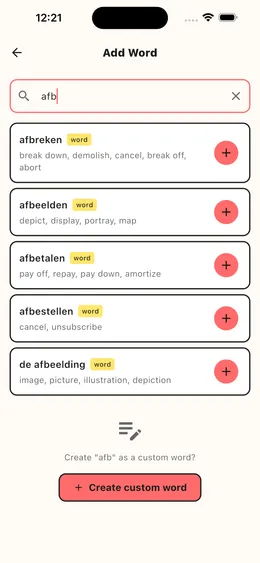
Searching the dictionary
The Add Word screen searches about 3,900 curated Dutch words (as of October 2026) as you type, from two letters up. It matches Dutch text only, so you search for "huis", not for "house". Each result shows its meaning in your language and an "In vocabulary" badge if it is already on your list.
Tap a result to open its word card: the article (de or het) for nouns, the part of speech, a separable flag on verbs, forms such as the plural, the diminutive and the past tenses, meanings with notes on register (informal, formal, slang and so on), pronunciation audio, and an illustration where one exists.
Creating a word that is not there
Signed-in users can create a new word. PolyYapp uses AI to check it is a real Dutch word and reduces it to its dictionary form, so "liep" becomes "lopen". If that form already exists, the existing entry is added to your list instead of a second copy. Otherwise the meanings and grammar are generated for it.
Creating new words is limited to 10 a day per user, and it is the one learning feature that needs Sign in with Apple. Adding words that are already in the dictionary works for everyone.
Managing your list
My Words has Active and Ignored tabs and a filter for your own words. You can reset a word's progress, ignore it, restore it, or delete a word you created yourself. Ignoring, restoring or deleting a word can be undone straight away; resetting its progress cannot.
What it does not do
- Search does not find words by their meaning in another language.
- Creating new words needs Sign in with Apple and is capped at 10 a day.
- Your own words are reviewed, but they are never pushed as new words in lessons.
The other features
Spaced repetition
Every lesson is filled first with the Dutch words due for review, then topped up with new ones. Each word climbs its own review schedule.
Exercises
5 exercise types, from recognising a Dutch word to typing it from audio and filling it into a sentence. Harder ones unlock per word.
Daily word game
Guess-a-Word: one hidden Dutch word a day, the same for everyone. Ask yes-or-no questions in Dutch and an AI game master answers.
Learn in your language
Study Dutch straight from English, Spanish, French, Polish, Russian, Turkish or Ukrainian: one setting changes the app and the meanings.