
PolyYapp vs Anki: Ready-Made Dutch or Full Control
Short answer
PolyYapp vs Anki comes down to ready-made content against full control. PolyYapp comes with about 3,900 curated Dutch words (as of October 2026), picks what you study and drills each word with 5 exercise types, with nothing to set up. Anki ships no Dutch content: you download a shared deck or build your own cards, and in return you get a tunable scheduler, offline study, free sync and apps on every major platform. Pick Anki for control; pick PolyYapp to start today on iPhone, iPad or an Apple-silicon Mac.
Key points
- Anki ships no Dutch content: ready-made Dutch decks are mostly free community uploads on AnkiWeb, some are sold by third parties, and quality varies from deck to deck.
- PolyYapp comes with a curated Dutch word list and picks each lesson's words itself, with no deck, note type or setting to choose.
- Anki wins on control: SM-2 with a starting ease and interval modifier you set, or the opt-in FSRS with a retention target you set, plus daily limits and learning steps; PolyYapp's 14-level ladder has no settings at all.
- Anki studies fully offline and runs on Windows, macOS, Linux, Android, iPhone, iPad and the web; PolyYapp needs a connection and has no Android app.
- Desktop Anki and AnkiDroid are free and AnkiMobile on iPhone is a one-time purchase; PolyYapp is free with no in-app purchases and no ads today.
- Pick Anki to tune every card and interval or to study with no signal; pick PolyYapp if choosing and building decks is what keeps you from starting.
Anki facts on this page come from Anki’s official site and manual, the AnkiMobile Flashcards listing on the US App Store and its 500 most recent US reviews, all read on 31 October 2026. PolyYapp facts come from the app’s own code and live listing, checked the same day.
PolyYapp vs Anki: what is the difference?
PolyYapp and Anki both bring words back on a spaced-repetition schedule, and that is where the overlap ends. PolyYapp is a Dutch vocabulary app with the content built in: a curated word list, lessons that choose what you study, and a fixed schedule. Anki is a general-purpose flashcard engine with no Dutch in it at all: you bring the cards, and you control everything about them.
The first table covers learning. PolyYapp wins on what you get on day one and on Dutch-specific word data; Anki wins on scheduler control and on what a card can hold.
| App | Dutch content on day one | Setup before the first review | Review scheduler | Card and exercise formats | Dutch word data |
|---|---|---|---|---|---|
| PolyYapp | About 3,900 curated Dutch words (as of October 2026), with new ones drawn at random from one shared list. | None: no deck, note type or setting to choose. A lesson has up to 15 exercises, and any new words in it are previewed first. | A custom 14-level ladder; a miss drops a word one level. There are no settings for intervals or daily limits. | 5 exercise types per word: translation choice, reverse choice, listening, word scramble and fill in the blanks. | The article (de or het) on nouns where the data has it, plus plural, diminutive and verb forms, with separable verbs marked. |
| Anki | None. Anki ships no Dutch content; you download a community deck from AnkiWeb or write your own cards. | Choose or build a deck, a note type and settings. The AnkiMobile listing advises starting on the computer version. | SM-2, which calculates intervals from each card’s ease and the starting ease and interval modifier you set, or the opt-in FSRS, which calculates intervals from a retention target you set. Daily limits and learning steps are yours either way. | Front-and-back cards by default; cloze deletions, images, audio and sentences if you or a deck author build them. | Whatever the deck author added. There is no built-in dictionary and no grammar data. |
The second table covers everything around the learning, and here Anki takes three of the five columns: offline study, platforms and moving between devices. Neither app needs an account, so that column is a tie, and PolyYapp’s clear edge is that nothing costs money today on any device it runs on.
| App | Offline study | Platforms | Moving between devices | Business model | Account |
|---|---|---|---|---|---|
| PolyYapp | Not available. Lessons, words and audio come from the server, so a connection is needed. | iPhone and iPad, plus Apple-silicon Macs running the iPad app. No Android, Windows, Linux or web version. | Progress lives on PolyYapp’s server so it can follow you; optional Sign in with Apple links it to your Apple ID so it is not lost. There is no Android, Windows or web version to move to. | Free, with no in-app purchases and no ads today. The privacy policy reserves the right to add in-app purchases. | Not needed. Sign in with Apple is optional; it is required to create new custom words and to open the Profile screen. |
| Anki | Fully offline, with images and audio stored on the device. | Windows, macOS and Linux on the desktop, iPhone and iPad (AnkiMobile), Android (AnkiDroid) and the web (AnkiWeb). | Free AnkiWeb sync across all of them, or USB and AirDrop import on iOS. Users have reported sync not working smoothly (reviews read 2026-10-31). | Desktop Anki and AnkiDroid are free. AnkiMobile is a one-time purchase with no subscription and no ads. AnkiWeb and shared decks are free. | Not needed. An AnkiWeb account is required only for the optional sync. |
Does Anki come with Dutch vocabulary?
No. Anki Software LLC makes the flashcard engine and ships no Dutch content. Ready-made Anki Dutch decks are mostly free community uploads on AnkiWeb’s shared-deck library, some are sold by third parties, and otherwise you build your own cards. PolyYapp works the other way round: it comes with about 3,900 curated Dutch words as of October 2026, each with translations in the language you pick, text-to-speech audio in a Netherlands Dutch voice, and the article and forms where its data has them.
The AnkiWeb library is wide but uneven. A search for “dutch” on 31 October 2026 returned frequency decks, sentence decks, decks built around course books, a de or het drill and decks for French, German, Spanish and Russian speakers. Across the results, last-updated dates ranged from 2012 to 2026. One App Store reviewer described combing through “tens of thousands of decks made by random people full of mistakes”. No Dutch deck was checked card by card for this page. If you are going with Anki, the Anki Dutch deck guide covers five checks for any deck and a setup that works.
How does each app decide what you review?
PolyYapp decides for you. Each lesson is filled first with the words that are due, oldest first, and any free slots go to new words drawn at random from the curated list. Every word climbs its own 14-level ladder, from three quick learning steps through intervals of 10 minutes up to 30 days. A correct answer moves a word up one level; a wrong answer or “I don’t know” moves it down one level, never back to the start. The spaced repetition hub lists every interval.
Anki hands those decisions to you. Its deck options offer two schedulers: the legacy SM-2 and FSRS, which the manual describes as an alternative that predicts forgetting more accurately. FSRS is opt-in. With SM-2 you set the starting ease, interval modifier and maximum interval, and it calculates each review from the card’s ease; with FSRS you set a target retention and it calculates the intervals. Either way you control daily limits and learning steps, and detailed statistics and graphs show how those choices play out.
The difference cuts both ways. PolyYapp has no settings to get wrong and none to improve: you cannot slow the flow of new words, follow a course book chapter by chapter or steer the app towards a theme. Anki lets you shape all of it, and every one of those choices is yours to get right or wrong.
What does each app show you about a Dutch word?
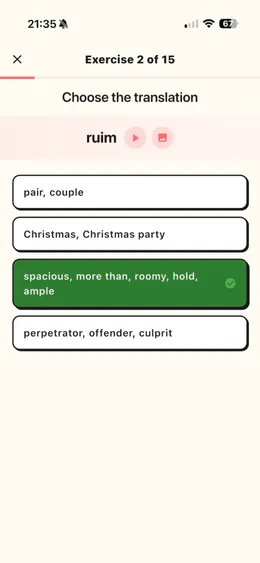
PolyYapp shows a structured word card for each dictionary word. Nouns carry de or het where the data has it, verbs show their past simple and past participle, separable verbs are marked, and meanings are tagged by register, such as informal, formal or dated. Practice then moves each word through 5 exercise types, unlocking the harder ones as you get it right: picking its meaning, picking the Dutch word, typing it from the audio, unscrambling its letters inside a sentence and filling it into a Dutch sentence.
An Anki card shows exactly what its author put on it. A deck with “het huis” on the noun cards teaches the article; a deck with “huis = house” leaves it out, and no setting fixes that. Anki’s answer is flexibility. You can write sentence cards, cloze deletions and image cards, and add audio anywhere. The template documentation describes a text-to-speech tag that reads a field aloud with the voices built into Windows, macOS and iOS; on Linux it needs an add-on, so voice quality depends on the device you review on. Making those cards good is manual work: sentences, audio and formatting all take time.
Can you add your own Dutch words?
Both apps let you, at very different costs. In PolyYapp you search the Dutch dictionary and add a word from the search result with one tap (or tap the result to see its full word card first), with its meanings and forms already filled in. A word that is not in the dictionary can be created after Sign in with Apple, up to 10 new custom words a day: PolyYapp checks it is real Dutch, reduces it to its dictionary form and generates its meanings and grammar.
Anki puts no cap on cards because creating them is the whole point. The cost is that every field, example sentence and audio clip is yours to find. One limit on the PolyYapp side: its search matches Dutch text only, so you cannot look a word up by its English meaning.
Which one works offline and on more devices?
Anki, by a wide margin. Anki stores cards and media on the device and studies fully offline, with desktop versions for Windows, macOS and Linux, AnkiMobile on iPhone and iPad, AnkiDroid on Android and AnkiWeb in a browser, all joined by free sync. PolyYapp runs on iPhone and iPad, and on Apple-silicon Macs as the iPad app. PolyYapp needs an internet connection for every lesson, and there is no Android, Windows or web version.
Anki’s reach comes with friction. Sync was the most frequent topic in the 500 most recent US reviews of AnkiMobile, read on 31 October 2026, with 90 of them mentioning it, mixing praise with reports of sync not working smoothly. The AnkiMobile listing also describes the app as “a companion to the computer version of Anki, rather than a complete replacement for it”: note types cannot be modified on iOS and add-ons do not run there.
Anki vs PolyYapp business model
Anki is free everywhere except the iOS app. Desktop Anki and AnkiDroid cost nothing (AnkiDroid accepts optional donations), and so do AnkiWeb sync and the shared decks. AnkiMobile on iPhone and iPad is a one-time paid purchase with no subscription and no ads, and its App Store listing says its sales support both the computer and mobile versions. There is no free version of the AnkiMobile app, though AnkiWeb, a free service, also lets you study online in a browser. Price came up in 65 of the 500 recent iOS reviews.
PolyYapp is free to download and use, with no in-app purchases and no ads today. Its privacy policy reserves the right to add in-app purchases later, so this page does not promise it stays that way. Neither app needs an account: PolyYapp creates an anonymous profile on first launch, and Anki asks for an AnkiWeb account only if you want sync. Third parties also sell premium Dutch decks for Anki, which are separate from Anki itself.
When should you pick Anki instead of PolyYapp?
Pick Anki if you are a disciplined, self-directed learner who wants full control, offline study and one lifetime tool for everything you learn, not just Dutch. If you already use Anki for medicine, law or another language, want to tune FSRS, write sentence and cloze cards, record your own audio, edit on a desktop, study on Android or Linux, or drill a specific textbook from a shared deck, Anki is the better choice. It wins outright if you need to study without a connection, which PolyYapp cannot do.
Desktop Anki and AnkiDroid are open source, AnkiMobile has existed since 2010, and your collection lives on your device rather than on any single company’s servers. Users have reported a steep learning curve (36 of the 500 recent iOS reviews touched on it), so expect to spend time with the manual before the first review.
When is PolyYapp the better fit?
PolyYapp fits when choosing a deck, checking its cards and tuning a scheduler is the reason you have not started. After one welcome screen PolyYapp goes straight to lessons, with no level test, goal setting or sign-up in the way: the words are chosen, the schedule is fixed, and each word arrives with its article and forms where the data has them, text-to-speech audio and 5 ways to practise it. Meanings appear in the language you pick from 7 app languages, so a Spanish or Ukrainian speaker studies Dutch without going through English.
PolyYapp is also narrower than a full course, and narrower than Anki in what it can cover. It is a vocabulary trainer: no grammar lessons, no speaking practice, no exam mode, and new words arrive at random instead of in frequency order. If you want to compare it with other word apps first, best apps to learn Dutch vocabulary sets them side by side, and Anki alternatives for Dutch covers the wider field.
What this comparison could not confirm
Five things stay open. Whether FSRS is now the default for new Anki users is unclear: the manual read on 31 October 2026 describes it as opt-in, and that is how this page states it. No Dutch shared deck was downloaded or checked for accuracy, and the licensing of decks built from commercial course material is unclear, so nothing here rates a deck. The AnkiDroid listing on Google Play was not fetched, so Android details beyond “free, with optional donations” come from Anki’s own site. Review figures come from one storefront’s feed, the US App Store, and describe AnkiMobile only.
Questions
Is PolyYapp or Anki better for a complete beginner in Dutch?
Neither has a level test or a beginner path. PolyYapp asks for no setup: after one welcome screen you are in lessons, new words arrive at random from its curated list, and meanings appear in the language you pick. In Anki the order of words depends entirely on the deck you choose, and you have to learn Anki itself as well. Neither app comes with grammar lessons, so a beginner using either one still needs a course or textbook alongside it.
Which is better on iPhone, AnkiMobile or PolyYapp?
AnkiMobile is built as a companion to desktop Anki: its App Store listing advises starting on the computer version, note types cannot be modified on iOS and add-ons do not run there, but it studies offline and syncs with every other Anki app. PolyYapp works on the iPhone on its own, with Dutch words ready on day one and nothing to configure, but it needs a connection and has no version outside Apple devices.
Does PolyYapp work offline like Anki?
No. PolyYapp needs an internet connection: lessons, words and audio all come from its server, and the app cannot start without one. Anki stores cards and media on the device and works fully offline, so if you study on flights or with no mobile data, Anki is the better choice.
Does PolyYapp use FSRS or SM-2?
Neither. PolyYapp uses its own 14-level interval ladder, not SM-2 and not FSRS. A correct answer moves a word up one level and a miss moves it down one, never back to the start, and there are no settings for intervals or daily limits. Anki offers the legacy SM-2 scheduler, which calculates each interval from the card's ease and settings you choose (starting ease, interval modifier, maximum interval), and the opt-in FSRS, where you set a target retention and it calculates them; either way you control daily limits and learning steps.
Can I add my own words in PolyYapp the way I can in Anki?
Yes, within limits. In PolyYapp you search the Dutch dictionary and add a word with its meanings and forms already filled in. A word that is not in the dictionary can be created after Sign in with Apple, up to 10 new custom words a day, and the app generates its meanings and grammar. Anki lets you write any card you like, with no daily cap, but every field, sentence and audio clip is your own work.
Can I use PolyYapp and Anki together?
Yes. A workable split is PolyYapp for core Dutch vocabulary on your phone and Anki for the words, sentences and cloze cards you collect from a textbook, a class or the news. The two keep separate word lists, so a word you add in one does not appear in the other, and you will review some words twice.