
Anki Dutch Deck: Which Kind to Use and How to Judge One
Short answer
There is no official Anki Dutch deck. Anki ships no Dutch content, so you download a community deck from AnkiWeb or build your own. Judge any deck on five things: audio on every card, de or het on every noun, a named word source, clear licensing and a recent update. Anki suits self-directed learners who want that control. PolyYapp is the ready-made option on iOS: about 3,900 curated Dutch words (as of October 2026), already scheduled, with nothing to choose or set up.
Key points
- Anki has no official Dutch content: every Dutch deck on AnkiWeb is made by another learner, and quality varies from deck to deck.
- Of the ten top AnkiWeb results for "dutch" on 31 October 2026, three were updated in 2026 and four had not changed since 2020 or earlier.
- A good Dutch noun card shows the article (het huis, not huis); a card without it teaches only half the word.
- Anki's {{tts nl_NL:Front}} template tag (Front being your Dutch field's name) adds spoken Dutch to a text-only deck, using the voices built into Windows, macOS or iOS.
- Make sure "Import any learning progress" is unticked when importing someone else's deck, or you inherit their review intervals.
- PolyYapp is the no-setup alternative: a curated Dutch word list on a fixed review schedule, but it needs a connection and has no settings to tune.
Deck names and last-updated dates below come from AnkiWeb’s shared-deck search for “dutch”, read on 31 October 2026, and the setup steps follow Anki’s own manual, read the same day. No deck was downloaded and checked card by card, so nothing on this page is a quality rating.
Is there an official Anki Dutch deck?
No. Anki Software LLC makes the flashcard engine and ships no Dutch content at all. The main source of Anki Dutch decks is AnkiWeb’s free shared-deck library, where learners upload their own decks. Third parties also offer decks as files to import, outside that library. Refold’s NL1K deck is one of the paid ones: 1,100 cards with example sentences, images and audio that Refold describes as AI voices (page read 2026-10-31).
The Anki manual is frank about what a shared deck is. Decks are usually made by someone studying from other material, so they may carry no background or explanations, and the manual advises that for a complex subject, shared decks should supplement your main material rather than replace it. Learning Dutch counts as complex.
What kinds of Dutch Anki decks are there?
The ten top Dutch decks on AnkiWeb fall into six kinds: frequency decks ordered by how common each word is, starter decks of basic words, sentence decks, textbook or course decks that follow a course book or another product’s course, general vocabulary decks (some labelled by level), and narrow drills such as de or het. Further down, the search on 31 October 2026 also turned up decks labelled for the inburgering exam and the Dutch driving theory test, and decks for French, German, Spanish and Russian speakers; none of those was in the top ten.
The ten top results show how uneven the library is: three were updated in 2026, two in 2025, and four had not changed since 2020 or earlier. The note counts are approximate, decoded from AnkiWeb’s search response rather than read off a documented page.
| Deck | Kind | Last updated on AnkiWeb (read 2026-10-31) | Size, approximately | What to check before downloading |
|---|---|---|---|---|
| A Frequency Dictionary of Dutch | Frequency | 4 February 2026 | About 5,200 notes | It shares its name with a commercial Routledge book; read the deck page for how the two relate. |
| Dutch Core 100 - Basic words (EN NL with audio) | Starter | 14 July 2015 | About 200 notes | Small and old; the title promises audio. |
| Dutch Sentences with dual language audio | Sentences | 29 December 2020 | About 3,700 notes | Sentence cards teach words in context but are slower to review than word cards. |
| Nederlands in Gang (Dutch to English) 1-18 | Textbook or course | 8 October 2019 | About 1,100 notes | Named after a published course book; useful mainly alongside that book. |
| Duolingo Dutch | Textbook or course | 25 October 2026 | About 2,700 notes | Recently updated; built around another product’s course, by its name. |
| LearnDutch.org - 1000 Most Common Words in Dutch | Textbook or course | 13 February 2022 | About 1,100 notes | “Most common” by title, but its words come from the LearnDutch.org course; its description says it includes audio, and a user reported a missing lesson in 2025. |
| Nederlanki (EN - NL) v1 | General vocabulary | 30 May 2025 | About 6,500 notes | Large; check whether noun cards carry de or het. |
| DeepDutch: 15k Translations, Audio, Examples | General vocabulary | 30 August 2025 | About 5,000 notes | The title promises audio and example sentences; check where they come from. |
| Dutch: De vs. Het | Article drill | 10 January 2019 | About 1,000 notes | A single-purpose drill, not a vocabulary deck. |
| Dutch B1, B2, C1 Words and Example Sentences | General vocabulary, by level | 20 February 2026 | About 2,900 notes | Check how words were assigned to each level; the title does not say. |
How do you judge a Dutch Anki deck?
Five checks separate a usable Dutch Anki deck from a frustrating one: audio on every card, the article on every noun, a named source for the word list, licensing you can trust, and a recent update from an author who still answers questions. The word source, licensing and last update can be read off the AnkiWeb deck page and its comments before you download anything; audio and the articles show up in the first ten cards after import.
Check 1: audio on every Dutch card
A Dutch card without audio teaches you the spelling and leaves the sound to guesswork. Look for audio in the deck title or description, then play a few cards after import. Some shared decks bundle audio and others are text only; treat a deck that never mentions audio as text only until you have played a card.
A text-only deck can still speak. Anki’s
field documentation describes a template
tag, {{tts nl_NL:Front}} (replace Front with your Dutch field’s name), that reads a field aloud with the operating system’s built-in
voices on Windows, macOS and iOS. On Linux, Anki ships no speech engine and needs an add-on.
Voice quality therefore depends on the device you review on, not on the deck.
Check 2: de or het on noun cards
Every Dutch noun takes either de or het, and a card that says “huis = house” leaves out half of what you need to use the word in a sentence. A good deck writes “het huis” on the card, or keeps the article in its own field that the template displays. Open five noun cards after import: if the article is missing on any of them, it is probably missing everywhere. The de or het guide covers why the article is worth learning with the word.
AnkiWeb does have a dedicated article drill, “Dutch: De vs. Het”, last updated in January 2019. It works as a top-up. It cannot fix a vocabulary deck whose noun cards never showed the article in the first place.
Check 3: a named source for the word list
A frequency deck is only as good as its frequency source, so the description should name it. “The most common words” means little without a corpus behind it. The strongest kind of source is a published frequency list: Routledge’s A Frequency Dictionary of Dutch (Carole Tiberius and Tanneke Schoonheim, 2013) ranks 5,000 words from a 290-million-word corpus of written and spoken Dutch.
Course-based decks answer the question differently: the word list is whatever the course taught. The LearnDutch.org deck’s description says its words come from the free course on LearnDutch.org. Refold says its NL1K deck uses words hand-selected from Dutch media, without naming a frequency list (page read 2026-10-31). Both are honest descriptions. Neither is a frequency ranking you can check.
Check 4: licensing, or can AnkiWeb pull the deck?
Licensing matters because AnkiWeb can pull a shared deck. Anki’s FAQ on decks that disappear says a shared deck may be hidden while its copyright status is confirmed, and stays hidden until the author responds. A deck named after a commercial textbook, course or dictionary is the case to read carefully: the deck page should say how the deck relates to the original and with what permission. If it says nothing, assume the deck could vanish and keep your own exported copy.
The LearnDutch.org deck is a typical example of the gap: its description credits the course the words come from and states no licence either way.
Check 5: how recently the deck was updated
AnkiWeb shows a last-updated date on every shared deck, and the spread is wide: the ten top Dutch results ran from July 2015 to October 2026. An old deck is not necessarily wrong, since Dutch vocabulary changes slowly, but nobody is fixing its errors. Read the comments too. On the LearnDutch.org deck’s forum thread, a user reported on 28 August 2025 that the lesson 9 adjectives sub-deck appeared to be missing, and no reply had appeared when the thread was read on 31 October 2026.
Anki’s import documentation covers what happens to your notes when you import a newer version of a deck.
How do you set up a Dutch deck in Anki?
Setting up an Anki Dutch deck takes six steps, and the first one matters most: do it on the computer version of Anki. The AnkiMobile listing itself recommends starting there, because note types cannot be modified on iPhone or iPad and add-ons do not run on iOS.
- Install Anki on a computer. It is free on Windows, macOS and Linux. Create a free AnkiWeb account only if you want to sync to a phone later.
- Download the deck. In Anki, click Get Shared at the bottom of the deck list, search for “dutch”, open a deck and click Download. Then double-click the downloaded file or use File > Import. Shared decks cannot be added to AnkiWeb directly.
- Leave learning progress behind. Anki’s import documentation notes that you rarely want another user’s intervals and review history. In Anki 23.10 and later, make sure Import any learning progress is unticked so every card starts fresh.
- Fix the card template. Browse ten cards. If there is no audio, add
{{tts nl_NL:Front}}(replace Front with your Dutch field’s name) to the template. If nouns lack the article, add it to the Dutch field as you meet each noun. - Set your daily limit and scheduler. In the deck options, choose a number of new cards a day you can keep up with every day, because reviews pile up behind every new card. The deck options also hold the opt-in FSRS scheduler, an alternative to the legacy SM-2.
- Sync to your phone. AnkiWeb sync is free. On iPhone and iPad the client is AnkiMobile Flashcards, a one-time paid purchase; AnkiDroid is free.
Should you build your own Dutch deck instead?
Anki’s manual favours building your own and suggests using shared decks as a supplement, in its words: “Creating your own deck is the most effective way to learn a complex subject.” A workable middle route is to start from a shared Dutch deck, then add your own cards for the words you actually meet. Cards you write yourself carry your own context, and they skip words you will never use.
The cost is time. Every card needs a translation, the article for a noun, ideally a sentence, and audio, either from the text-to-speech tag or recorded yourself. Adding the words you meet in a textbook or the news as you go is manageable. Building a full beginner vocabulary from scratch means writing hundreds of cards before the first review.
When is a ready-made app a better fit than an Anki deck?
A ready-made app fits better when choosing, checking and fixing a deck is what stops you from starting. PolyYapp is that route on iOS: it comes with about 3,900 curated Dutch words (as of October 2026), fills each lesson with the words that are due, tops it up with new ones, and schedules every word on its own 14-level ladder; it is a custom ladder, not SM-2 or FSRS. Anki remains the better tool for a disciplined, self-directed learner who wants to control every card and interval, study with no connection, tune FSRS or drill a specific textbook.
PolyYapp’s noun cards show de or het, and plural and diminutive forms, where the word list has them, and every word has text-to-speech audio in a Netherlands Dutch voice. PolyYapp drills words with up to 5 exercise types, from picking the meaning to typing the word from its audio or into a Dutch sentence, and the harder types unlock per word.
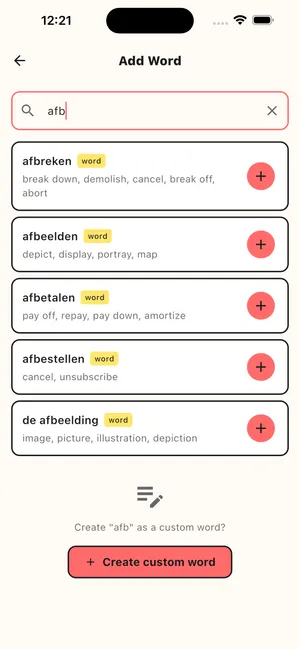
PolyYapp also gives up much of what makes Anki strong. PolyYapp needs an internet connection for every lesson. Its schedule has no settings, and new words are drawn at random from the list, not in frequency order, so you cannot follow a course book chapter by chapter. It runs on iPhone, iPad and Apple-silicon Macs, with no Android app. PolyYapp is a vocabulary trainer, not a full course: no grammar lessons, no speaking practice and no exam mode. It is free to download and use, with no in-app purchases and no ads today, and needs no account. The full side-by-side is on the PolyYapp vs Anki page.
Questions
What is the best Anki deck for Dutch?
There is no single best one, and no Dutch deck on AnkiWeb was checked card by card for this page. For a beginner building vocabulary, look for a frequency deck with audio and articles on the noun cards. Run any candidate through the five checks: audio, de or het on nouns, a named word source, licensing and the last update date.
Is there an Anki deck for de and het?
Yes. AnkiWeb lists a deck called "Dutch: De vs. Het", last updated on 10 January 2019 when read on 31 October 2026. A dedicated drill helps, but the more durable fix is a vocabulary deck whose noun cards always carry the article, so you learn "het huis" as one unit instead of memorising the article separately later.
Do Anki Dutch decks come with audio?
Some do and some do not. The LearnDutch.org deck's description says it includes audio of the Dutch words; other shared decks are text only. Anki can fill the gap with its text-to-speech tag, {{tts nl_NL:Front}} (with Front replaced by your Dutch field's name), which uses the voices built into Windows, macOS and iOS. On Linux it needs a text-to-speech add-on.
Can I keep my progress if a shared deck gets updated?
Usually. Anki's manual says that importing a newer file updates the notes you already have by default. The exception is a deck whose author changed the note type: Anki can then import the new notes but generally cannot update the ones you imported before.
Can I study an Anki Dutch deck offline on my phone?
Yes. The AnkiMobile listing says that media in your cards, including audio clips, is stored on the device, so you can study without an internet connection. You only need a connection to sync with AnkiWeb. Audio added with the text-to-speech tag comes from the phone's own voices rather than from the deck.